How Carpool.School Connects You With Families Going Your Way
May 17, 2026 · Krishna Kamath
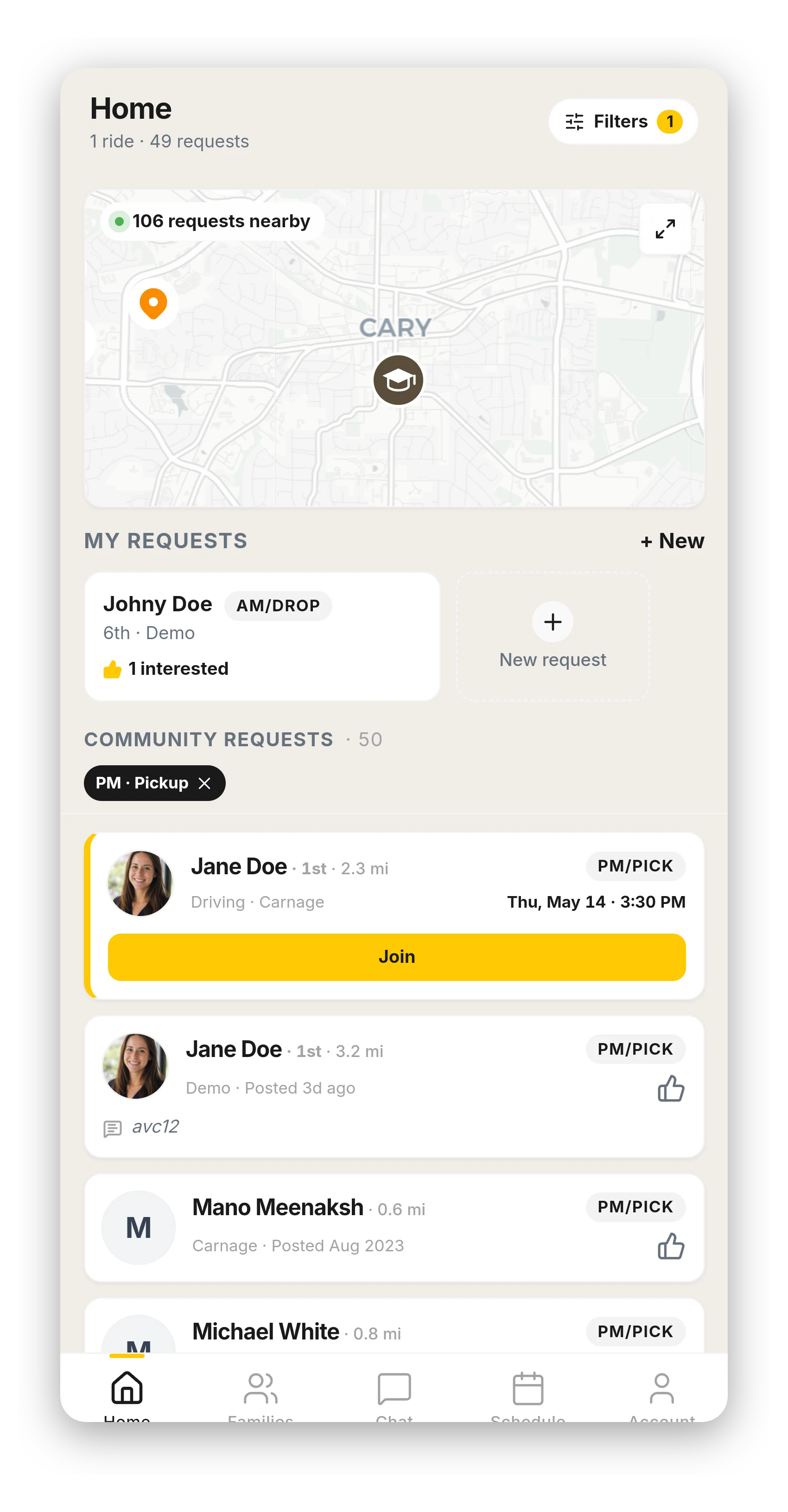
Two questions new parents ask: how does this find me a carpool, and are my kids safe with these families?
The first is what this post is about: how Carpool.School surfaces nearby families going your way, by route and schedule. The second has an honest answer: Carpool.School doesn't pre-vet families or make safety guarantees. Like any informal carpool, the safety call stays with you. What the platform does is surface more families and help you know more about them before you decide.
The Home feed
When you open the app, the Home tab shows you families nearby. Specifically: families in your community whose schedule overlaps with yours and who live close enough that a carpool is plausible.
The feed is community-scoped. You only see families in communities you've joined. A parent in a different community doesn't appear, even if you're at the same organization. The feed lives inside the community you chose to be part of, and stays there.
What the app looks at
Four signals decide who shows up in your feed:
- Proximity. Families who live close to your home surface higher in the feed.
- Schedule overlap. Same drop-off window, same pickup time. A 7:50 drop-off parent isn't useful to an 8:30 drop-off parent.
- Days of the week. Carpools need at least one shared day to be worth coordinating.
- Activity overlap. Kids in the same activities (chess club, swim team, soccer) often need rides outside the regular drop-off and pickup times. This signal captures those too.
Carpool.School sorts by overall route and schedule overlap and surfaces the closest fits first.
The map
A map at the top of the Home tab shows you a household-level view of the community. One pin per home: two kids at the same address show as one pin, not two. Your home pin is filled yellow; other families are teardrop pins. Tap a pin to see who's at that house. Tap their card to see if your schedules overlap.
The map is a quick visual scan of "who's actually nearby" before you drill into the list.
Starting a conversation
Three steps from "I see this family in the feed" to ready-to-carpool:
- Message. You can message any family in your community. They see your name and profile, and that's the starting point. No phone numbers or addresses change hands yet.
- Meet. Most families meet in person before going further. Coffee, school pickup, school orientation. We don't push this; parents do it on their own time.
- Connect. Both of you formalize the connection in the app. The family becomes a direct contact, calling them through the app becomes available, and the carpooling tools below unlock.
Once you're connected
Connecting unlocks the full set of carpooling tools:
- Share recurring drives. Set your driving days; the other family sees them in their schedule.
- Live ride tracking. When a driver's en route, the parents waiting can see where the car is.
- Pickup confirmations. Each pickup is logged when it happens.
- Schedule changes. Updates flow to everyone in the pool, not just the people who happen to check the app.
Everything above is gated on the connection. Until then, conversation only.
What we don't do
- We don't run background checks. Trust gets built when families meet in person.
- We don't show your exact address to anyone.
- We don't share your phone number until you accept a connection.
- We don't sell your data.
- We don't push you to "expand your radius" or do anything outside your community.
The app surfaces families. The parents do the carpool. The privacy is the floor; the trust is yours to build.
The trust signals that inform parent decisions →
Why some communities carpool and others don't →
Read the full End User License Agreement →