Join Requests: One Link You Can Post Anywhere
July 22, 2026 · Krishna Kamath
Growing a carpool community takes two things: getting the word out, and giving families a way in. The Launch Kit covers the first. This is about the second, and about the families who show up before you've sent anything at all.
How families get in, and what it assumes
Parent-led admins share their community's invite link privately: a group chat, a class email list, a PTA newsletter. Staff-led admins point families to an interest form, then verify and invite from what comes back.
Both work, and if you have the channel or the form, keep using them. They're still the fastest path when they fit. But each one assumes something: a private channel you post in regularly, or the time to set up a form and work the responses by hand. Plenty of admins have neither. A volunteer agrees to run the group chat and checks it twice a month. A front office is juggling twenty other things.
Families are already finding you
Some families arrive without you lifting a finger. A neighbor mentions the carpool at pickup. A sibling's classmate passes the name along. Someone searching Carpool.School for their school finds your community sitting right there. However they get there, they land on your community page, where they can ask to join.
Until now, each ask fired off an email the moment it arrived, and that email was the whole system. No list of who had asked, no way to tell a handled ask from a forgotten one, nothing for another admin to pick up. Miss the email and the ask was gone. If it reached a shared inbox, it sat there.
The interest was already there. Those families just weren't getting an answer.
One link you can post anywhere
So there's now another way in, and it's the one that works for everybody: a built-in request-to-join link, parent-led or staff-led alike. It grants nothing on its own. A family who follows it can ask, and that's all it does.
Nothing else goes away. Keep the group chat, keep the interest form. This is just the link you can put where those two can't go:
- The yard sign in the carpool lane, read by every parent who drives past it
- A public Facebook group or neighborhood page
- The school newsletter that goes to all families and gets forwarded around
- A flyer on the bulletin board, a table at back-to-school night
That's reach a private group chat was never going to give you. The worst case is that somebody asks and you decline.
Approve, decline, or do nothing
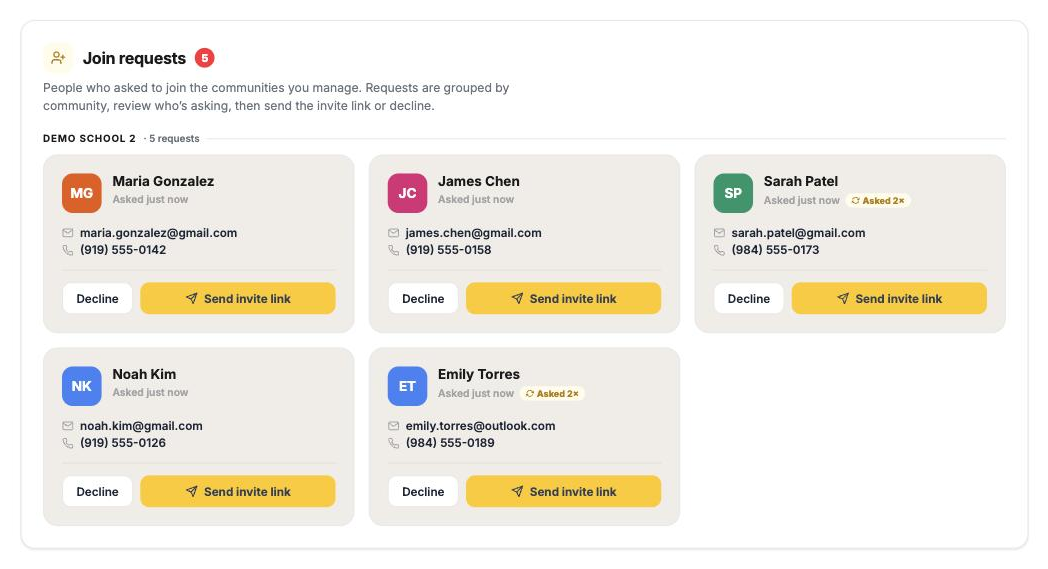
Every ask lands in one place: a Join Requests list under Account for parent-led communities, or in the admin portal for staff-led. It appears there the moment a family asks, with who asked, when, and whether they've asked more than once. Email is where the batching happens: one daily digest of what's new, instead of a message per family. Every admin gets their own copy, so in a staff-led community whoever opens it first can clear the queue, and anything handled drops off everyone's list. Parent-led communities have a single admin, so that one is you.
| You | What happens |
|---|---|
| Approve | The invite email goes out on its own. No second step, nothing to copy elsewhere. |
| Decline | The request closes quietly. The family isn't told, and can ask again later. |
| Do nothing | The request expires by itself after 30 days. |
Approving is the end of your involvement.
Staff-led communities don't loosen. A request is a family raising their hand, exactly like an interest form response. You still check them against your records before approving, and approving sends the same personal invitation a roster upload does. They sit in Invited families as pending until they join. The verified badge means what it always meant.
Parent-led: still want instant joining?
Parent-led admins who'd rather move fast than review anyone can switch back to the community-wide invite link. Anyone holding it joins immediately with no approval step, so it belongs in channels only your own families see. The Launch Kit labels it plainly when you pick it, and switching back is one tap.
Open-enrollment communities skip the gate by design. There, the same request link simply admits a family the moment they land on it.
What changed in the Launch Kit
All six materials now default to the request-to-join link, for every community type. The yard sign, the social graphic, the printed flyer: use them exactly where they'll get seen the most.
If you already run your own interest form, you can still point the kit at it. But you no longer need one to get started: the built-in link feeds the same reviewable list.
See The Parent Path and The Staff Path for how each community type is set up end to end.
Review when it works for you
A family scans the yard sign in the pickup line on Tuesday. Wednesday morning's digest mentions them, you tap approve over coffee, and their invite is in their inbox before the afternoon car line.
Nothing here needs you online at the right moment. Requests wait in the list, the daily email tells you what's new, and approving one is a single tap. An ask no longer has to reach the right person at the right time to go anywhere.
So put the link where families will actually see it. The Launch Kit already builds it into all six materials: the yard sign for the carpool lane, the flyer for the bulletin board, the blurb for your next newsletter. Put one out this week, then again next month. The asks will find you.