Parent-Led or Staff-Led: The Questions Every Admin Asks Before Launching
July 10, 2026 · Krishna Kamath
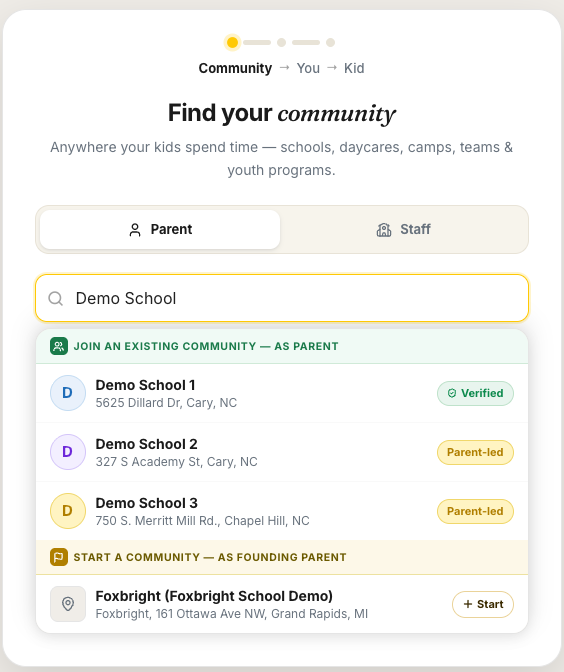
Updated July 23, 2026 for Join Requests, one link you can post anywhere.
When a school or PTA gets ready to launch Carpool.School, the same questions come up: which type should we pick, who runs it, what does it cost, and what happens to student information? This post answers them the way we answer them over email, so PTAs, school staff, and parents can all work from the same page.
Should we set up as parent-led or staff-led (verified)?
Both community types have all the same carpooling features. The difference is how families get in.
A parent-led community uses one shared invite link by default (there's also an open-enrollment option for groups that want maximum reach, but most school communities keep it invite-only). The parent who creates the community can post it in newsletters, private Facebook groups, WhatsApp chats, wherever your families already are. Anyone with the link joins instantly.
A staff-led community adds a verification layer. Instead of one shared link, families receive personal invite links tied to an email address the school uploads through our admin portal. Only invited families can get in.
If you're weighing cost and upkeep, start parent-led: it's free permanently and there's nothing to maintain. If your community wants the assurance that every member was verified against a school-provided list, go staff-led. You can start one way and switch later.
Can a parent create their own community even if one already exists for our school?
Yes. Multiple parent-led communities can coexist at the same school: a general one for everyone, and smaller ones for a specific need, such as a particular pickup arrangement, a special program, or a handful of families who already coordinate together.
Sometimes it's not about need at all: some parents are simply more comfortable using the carpool coordination and scheduling tools within a small circle they already know and trust. Either way, starting a smaller community of your own is a normal use case, not a workaround.
Any parent can start one at any time, no approval needed from us or from an existing community's admin. The founding parent becomes the admin, and the new community is fully independent: not a sub-group under anyone else's oversight. Families can belong to more than one, so a smaller circle doesn't take anyone away from the main community.
We suggest a suffix in the name so families can tell communities apart at a glance: "Enloe High Summer School" or "Enloe High Breckenridge Parents."
Does the parent-led admin have to approve each joiner?
No approval step for the families you invite. Many PTAs run WhatsApp or Facebook groups where a volunteer approves every join request by hand. It's tedious, and it doesn't really verify anything: volunteers usually have no way to confirm that a joiner belongs to the community. So we never require it. Anyone with the invite link joins instantly.
The request-to-join link plays a different role: it's the public-awareness link, the one the Launch Kit puts on flyers and yard signs by default. Families who find you that way ask first, and you approve or decline in one tap. (There's also an open-enrollment option with no gate at all: families join the moment they arrive, nothing to approve.)
Approval isn't the only control either. Admins can remove a family who joined and shouldn't have. In a parent-led community, admins can also rotate the join code at any time, which immediately invalidates old invite links, useful if one ever gets shared somewhere it shouldn't have.
What does it cost?
Parent-led communities are free permanently, not a trial. All carpooling features included.
Staff-led communities are a paid annual subscription (see pricing). If your school district is part of a pilot, the pilot year is free and the subscription begins in Year 2.
Do parents pay anything?
No. The app is free for families in both community types. The subscription, where there is one, is paid by the school or organization.
What student information do you collect?
Only a name and grade (grade optional), plus any activities you add to find matching carpools. That's just enough for other families to recognize you as "John's mom." We never pull student data from a roster into profiles, and we never sell or share it with anyone.
In a parent-led community, admins never upload family data: families volunteer their own information when they sign up. In a staff-led community, the school uploads parent emails and interested families are checked against that list. If a family never joins, their contact information isn't retained.
For the full picture of who can see what and when, read how privacy works on Carpool.School.
In a staff-led community, does everything fall on school staff?
Not entirely. School staff must be the ones to claim the school and create the staff-led community. That's the foundation of the verification model. But once the community exists, the staff admin can add other admins, including PTA members, who can then help manage invites.
One responsibility comes with that: whoever administers the community, staff or PTA, must ensure that every parent email they upload belongs to a family with a child in the community. That's what keeps a verified community true to its name.
Our PTA board turns over every year. What happens to the community?
It survives the turnover. Parent-led admins can transfer ownership to another parent at any time, no need to close or rebuild anything. In a staff-led community, there can be several admins, so responsibility never rests on one person.
Families come and go all year. How do we keep the list current?
Staff (or any admin) can re-upload the parent email list anytime through the same admin portal, no separate process, no support ticket.
How do we get the word out to families?
You don't have to build flyers or format links yourself. Every community comes with a launch kit, six ready-to-share materials generated from your community's name and link:
- A parent email
- A social media post
- A printable flyer
- A newsletter blurb
- A group-chat text for WhatsApp or ClassDojo
- A yard sign for the carpool lane, where parents are already waiting with phones in hand
Each one includes a scannable QR code, and by default every material carries your community's request-to-join link, whichever type you run. It only collects asks, so anything you generate is fine to post anywhere: the school website, social media, a public flyer, a yard sign in the carpool lane. Staff-led materials also carry your school logo.
Want to bring families in as a group, without approving each ask? Parent-led admins can swap in the community-wide invite link, but keep that one to private channels since anyone who has it joins instantly. Staff-led admins can upload parent emails straight from your records: one upload, a personal invite to every family. See the Launch Kit for the full breakdown.
We're printing our back-to-school mailer: what goes in it?
Use the printable flyer from your launch kit. It's built for exactly this: your community name, a scannable QR code, and a short call to action, all sized for a handout or mailer insert.
By default the QR code sends families to your request-to-join link, which only collects asks, so you can print and mail it anywhere. Parent-led admins who want scan-and-join can point it at the community-wide invite link instead.
If you haven't picked a community type yet, don't let the print deadline force it. You can start parent-led and switch to staff-led later: the default request link doesn't rotate, and if you switch we migrate your community in place, so printed copies keep working. The one exception is a printed community-wide invite link, since rotating its join code invalidates it and means a reprint.
Can we switch from parent-led to staff-led later?
Yes. If your parent-led community is still small and nothing's in print, the fastest route is to close it and start fresh: the admin removes the other members, then removes their own child's profile, and the community closes automatically. From there, school staff click Get Started and follow the Staff path to create the staff-led version. If your community already has many families, or you've printed materials with your request link on them, contact us and we'll migrate your community in place: everyone stays, and printed QR codes keep working.
Still deciding? Write to us at support@carpool.school. These questions help everyone, and we're happy to answer more of them.